
In this article, we will understand Hilt component classes and scope annotations in Android development. We will understand how Hilt generates components and uses scope annotations to control bindings. It includes examples and best practices for using components and scopes in Hilt. So stay tuned!!
For every Android class added to the Hilt tree, Hilt generates an associated Component class and a Scope annotation.
What is a Hilt Component Class?
Hilt component class is a class responsible for injecting the bindings into the corresponding Android classes. This is same component which we referred in the @InstallIn annotation while creating a Hilt Module.
What is a scope annotation?
By default, all bindings in Hilt are unscoped. This means every time I inject a binding, a new instance of that type will be created.
But what if I want the same instance of a binding throughout my application or I want the same instance of a binding in all fragments of an Activity. For such cases, Hilt gives us an option to scope a binding. It creates a scoped binding once per instance of the component that the binding is scoped and all requests for that binding share the same instance.
Let’s see the component classes and their scopes for all Android classes that Hilt supports.

The above table shows the generated components and scopes in a hierarchy. That means Application class scope is bigger than Activity scope which is bigger than the ViewModel scope and so on.
Now let’s checkout some examples
Example 1:
Get the same instance of database throughout my application by just annotating the required dependency (in our case AppDatabase) with @Singleton (scope annotation for Application class)
@AndroidEntryPoint
class MainActivity : AppCompatActivity(){
    @Inject
    lateinit var database: AppDatabase
}
@AndroidEntryPoint
class ProductsFragment : Fragment(){
    @Inject
    lateinit var database: AppDatabase
}
@Singleton
class AppDatabase: RoomDatabase{}
Example 2
Get the same instance of AppDatabase for each activity by annotating the required dependency with annotation @ActivityScoped.
@AndroidEntryPoint
class MainActivity : AppCompatActivity(){
    @Inject
    lateinit var database: AppDatabase
}
@AndroidEntryPoint
class ProductsFragment : Fragment(){
    @Inject
    lateinit var database: AppDatabase
}
@ActivityScoped
class AppDatabase: RoomDatabase{}
Example 3 (An important one)
I changed the scope of my AppDatabase class to @FragmentScoped
@FragmentScoped
class AppDatabase: RoomDatabase{}
Now when I run the application, it gives me a compile time error. Why so??
I am using the AppDatabase class in my activity which is above in the hierarchy that a fragment. I can not inject a dependency with a smaller scope in a class which is higher in the hierarchy. So I can’t have my AppDatabase class to have @FragmentScoped scope if I want to inject it in my activity.
An important question now is: How are these classes created? When do they get destroyed? Do I have to put them to garbage collection?
We don’t have to do anything!!!
Hilt automatically creates and destroys instances of generated component classes following the lifecycle of the corresponding Android classes which means that the ActivityComponent is created when an Activity is created and is destroyed when the Activity is destroyed.
Here are the lifecycles of all the generated components.
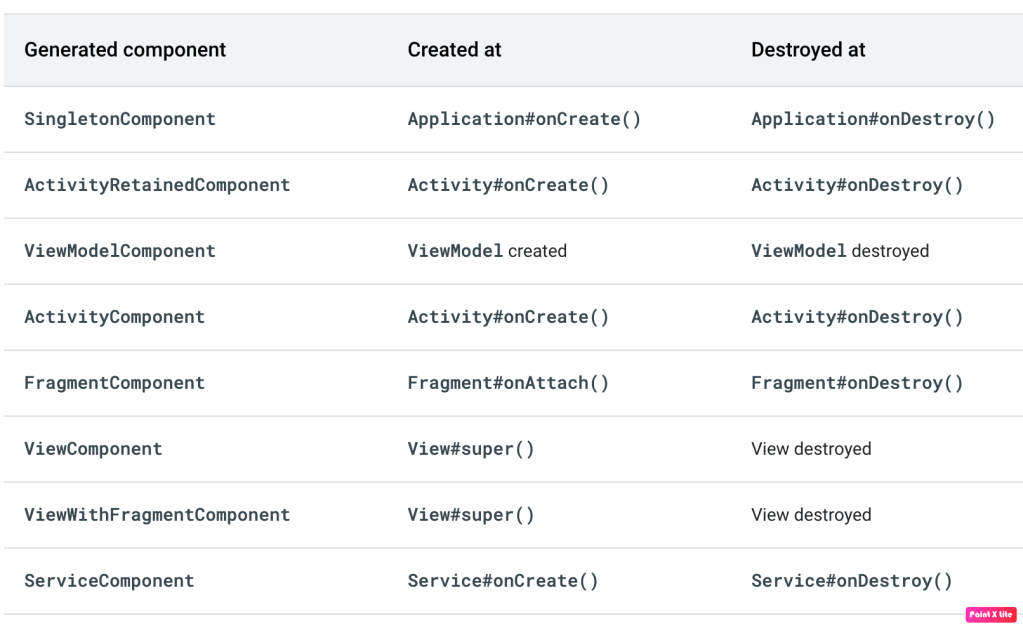
A few points to note for Hilt components and scopes:
1. Hilt doesn’t generate a component for broadcast receivers because Hilt injects broadcast receivers directly from SingletonComponent.
2. ActivityRetainedComponent lives across configuration changes, so it is created at the first Activity#onCreate() and destroyed at the last Activity#onDestroy().
3. Scoping a binding to a component can be costly because the provided object stays in memory until that component is destroyed. Minimize the use of scoped bindings in your application. It is appropriate to use component-scoped bindings for bindings with an internal state that requires that same instance to be used within a certain scope, for bindings that need synchronization, or for bindings that you have measured to be expensive to create.
Conclusion
Hilt simplifies dependency injection in Android by generating component classes and automating instance management based on lifecycle. It provides scope annotations for consistent usage of bindings. Overall, Hilt streamlines the process of injecting dependencies in Android development.
That’s it for this article. Hope it was helpful! If you like it, please hit like. Don’t forget to visit the provided links to other articles in the series and show your appreciation.
In the next article, I will focus on how to inject dependencies in classes which are not supported by Hilt.
Checkout the other articles of the Dependency Injection series:
 Tanya Tech Zone