
Just like other languages, Kotlin also has exceptions to indicate that something abnormal or unexpected has occurred during the execution of your program. An exception can occur due to variety of reasons like invalid input, resource unavailability, programming errors etc.
Throwing an Exception
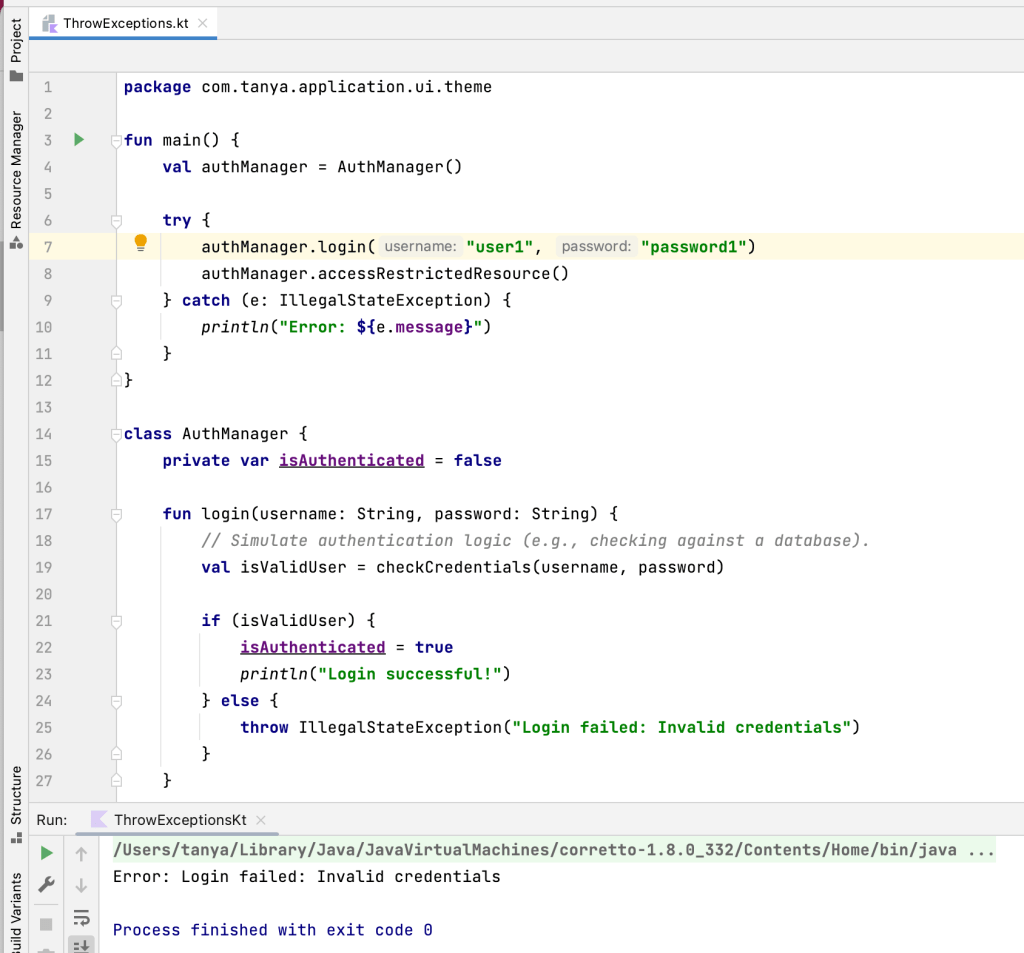
Kotlin allows us to manually signal that an exception has occurred using throw operator. One of the most common exceptions that you will see is IllegalStateException which indicates that the current state of your program does not allow for the requested action to be completed. This is useful because you can pass IllegalStateException a string to provide more information about what went wrong.
Custom Exceptions
To define a custom exception, you define a new class that inherits from some other exception.
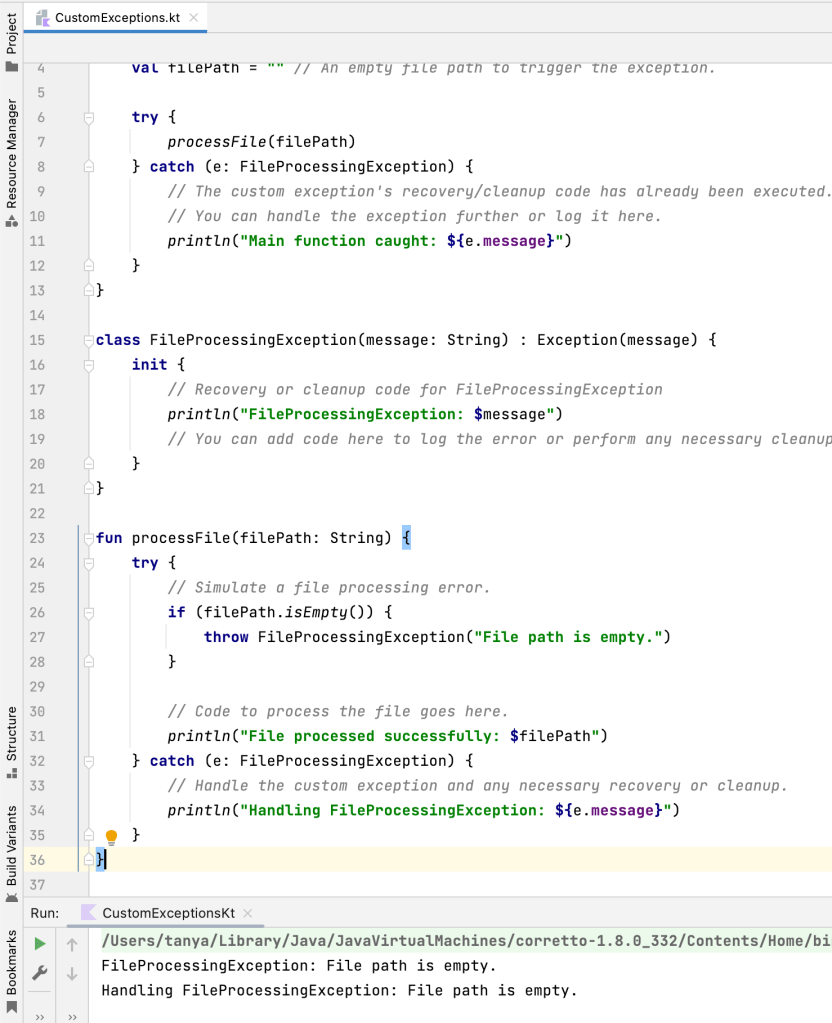
Custom exceptions are flexible and useful. Not only can you use them to print custom messages, but you can also add functionality to be executed when the exception is thrown. And they reduce duplication, as you can reuse them across your codebase.
Handling Exceptions
Like many other languages, Kotlin exceptions can be handled using try/catch block as you saw in the above two examples.
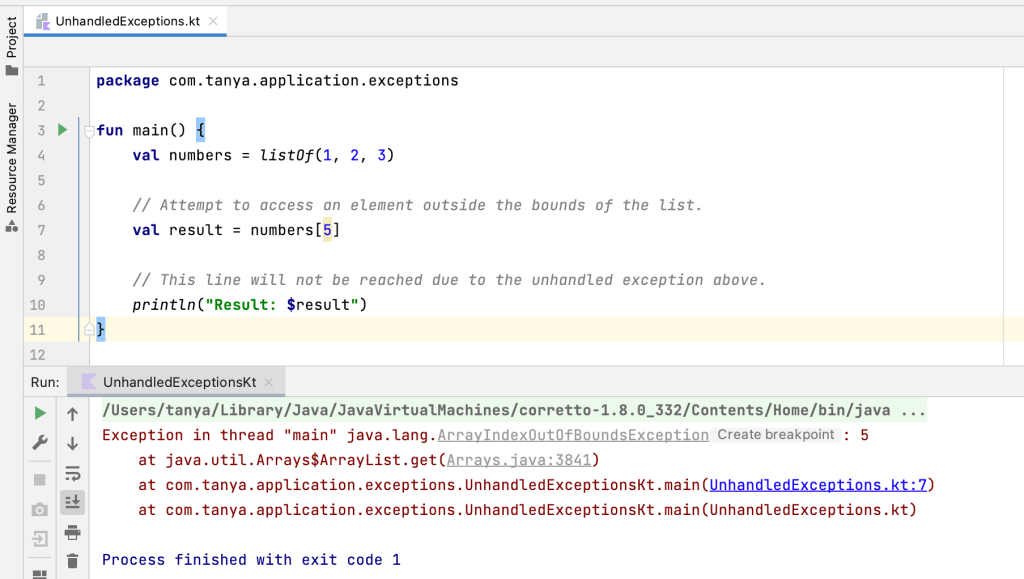
Because you handled the exception using a try/catch block, code execution can continue as if a dangerous operation never caused an issue. But, an unhandled exception will crash your program, halting execution.
Precondition Functions
Unexpected values can cause your program to behave in unintended ways. As a developer, you will spend plenty of time validating input to ensure you are working with the values you intend. Some sources of exceptions are common, like unexpected null values. To make it easier to validate input and debug to avoid certain common issues, Kotlin provides some convenience functions as part of its standard library. They allow you to use a built-in function to throw an exception with a custom message.
These functions are called precondition functions because they allow you to define preconditions – conditions that must be true before some piece of code is executed.
Kotlin includes a few precondition functions in the standard library. Let’s understand a few of them
checkNotNull
The checkNotNull function is used to check if a given value is not null, and if it is null, it throws a NullPointerException. Here’s an example of how to use checkNotNull in Kotlin:

As you can see, checkNotNull is useful when you want to ensure that a variable is not null, and it helps you catch potential NullPointerExceptions early in your code.
require
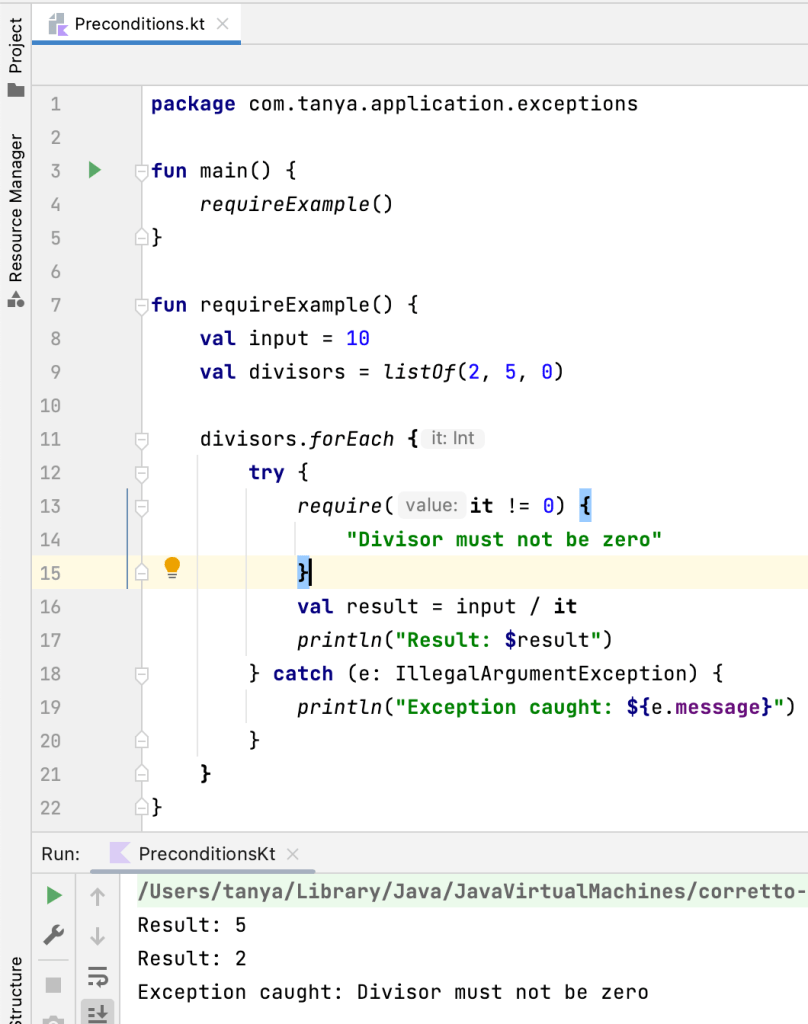
The require function is used to check if the argument is true or false, and if it is false, it throws a IllegalArgumentException. Here’s an example of how to use require in Kotlin:
requireNotNull
The requireNotNull function is used to check if the argument is not null, and if it is null, it throws a IllegalArgumentException. Here’s an example of how to use requireNotNull in Kotlin:

Notice something different here??
The forEach loop ran for values after null as well but that didn’t happen in our checkNotNull example. Why did that happen??
This is because in our checkNotNull example, the loop was inside the try block whereas in requireNotNull example, we had a different try/catch block for every iteration of the loop. So, when an exception occurred in our requireNotNull example, it just handled the exception and moved on to the next iteration, whereas when an exception occurred in checkNotNull example, we were thrown out of the loop itself.
error
The error function allows us throw a IllegalStateException when an unexpected condition occurs in our program. Here’s an example of how to use error in Kotlin:

What’s the difference between require and error?
Both throw IllegalStateException. In require, we pass the condition as argument that must be true for the next statements to execute. If the condition is false, it throws an exception with the message. But while using error function, we have to check for conditions using conditionals and then just call error function with the message that we want to be displayed along the Exception.
To conclude, here are the key takeaways from this article on exceptions in Kotlin:
- Kotlin allows us to throw exceptions using the
throwoperator to indicate abnormal or unexpected situations during code execution. - Custom exceptions can be defined by creating a new class that inherits from an existing exception class.
- Exceptions can be handled using try/catch blocks, which allow code execution to continue in case of an exception.
- Precondition functions in Kotlin’s standard library, such as
checkNotNullandrequire, help validate input and throw exceptions with custom messages to ensure correct program behavior. - The
errorfunction can be used to throw anIllegalStateExceptionwhen unexpected conditions occur.
By understanding and utilizing these exception handling techniques, developers can create robust and reliable Kotlin programs.
That’s it for this article. Hope it was helpful! If you like it, please hit like.
Other articles of this series:
For more articles on Kotlin, check out this link.
 Tanya Tech Zone