When most of us hear the word GraphQL, we think of it as a query language like SQL, which isn’t true. Yes it is a query language, but for graphs.
GraphQL = Graph + Query + Language
It is an application query language in which you ask for things like “Person in age group teens” and not “SELECT * FROM people WHERE age > 12 AND age < 20”. The former is how clients ask for data from the server, and the latter is how the server might fetch that data and clients don’t need to know about that. All the client needs to know is that the application has an age group called teens.
What is GraphQL?
GraphQL is a new API standard that provides a more efficient, powerful and flexible alternative to REST(Representational State Transfer).
It enables declarative data fetching where a client can specify exactly what data it needs from an API.
Instead of multiple endpoints that return fixed data structures, a GraphQL server only exposes a single endpoint and responds with precisely the data that a client asked for.
It is an open source query language for APIs, and a server-side runtime for executing queries.
Why GraphQL?
1. No over fetching or under fetching of data
A backend generally serves multiple frontend clients each with different data requirements. But in most cases, the APIs are kept same for all frontend clients.
Let’s say we have an API to get user details.
/userIn response of this API,
Client 1 requires: id, name, address, pincode
Client 2 requires: id, name, age, posts
Using REST API
In order to cater both the clients needs, the backend will have to keep the response like this:
{
"id": 1,
"name": "Tanya",
"address": "Delhi",
"pincode": "110098",
"age": 15,
"posts": [
...
]
}
Both the clients will be over fetching as they will be getting fields they don’t need.
Using GraphQL API
The backend will just decide which fields the clients have access to. And each client has the power to decide which fields they want in response. This makes the API response faster as there is no over fetching of data.
2. Reduced bandwidth usage and battery consumption
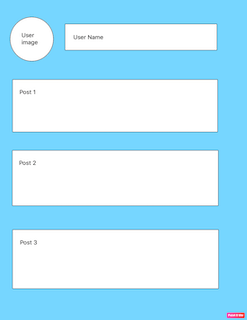
Let’s assume we have a screen which shows a user’s details and a list of posts created by the user.
Using REST API

In order to get data for this screen, we will have to hit 2 APIs.
/user
/user/posts
Using GraphQL API

We can write a single query which will return the user details and the posts created by that user.
query getUserData{
id,
name,
image,
posts
}
Reducing the number of APIs hit reduces the internet usage of the users, hence reducing battery consumption as well.
How does GraphQL work?
A GraphQL server has 2 core parts that determine how it works: a schema and resolve functions.
Schema
The schema is a model of the data that can be fetched through the GraphQL server. It defines what queries clients are allowed to make, what types of data can be fetched from the server, and what is the relationships between these types.
A schema looks something like this:
type Product {
    id: ID!
    name: String!
    description: String
    imageUrl: String
    active: Boolean!
    productVariants(product_Id: Float): [ProductVariant]
    brand: String
}
type ProductVariant {
    id: ID!
    product: ProductNode!
    attribute: String
    active: Boolean!
    inventory: Float
}
type Query {
    getAllProducts(): [Product]
    getVariantsOfProduct(productId: Int): Product
    getProduct(id: Int, name: String, brand: String): [Product]
}
Every schema has multiple types where each “type” represents a type of data that can be returned just like a model class.
Along with this, there is an additional type named “Query”. It specifies the multiple entry points into the schema where each field specifies following things:
- Query name: Every query that a client writes has to start with one of the fields specified in this type Query like getAllProducts or getVariantsOfProduct.
- Response type: The type written after the colon specifies what data a client can get from this query. For eg.
query getAllProducts{
    name,
    image
}
In the schema, the getAllProducts query has response type as list of type Product. Now the product type has 7 fields but it depends on the client what they want.
In our example above, we are requesting only the name and image of the product. So the response will look something like this:
[
  {
    "name": "Product A",
    "image": "https://imagea.in"
  },
  {
    "name": "Product B",
    "image": "https://imageb.co"
  }
]
4. Query Filters: The parameters specified in the parenthesis are the filters which can be applied on the response. For eg.
Query to get product by id
query getProduct(id: 1){
     id,
     name,
     description
}
Similarly, we can use the same query field to filter products by brand
query getProduct(brand:"GAPL"){
     id,
     name,
     image,
     description
}
The schema tells the server what queries clients are allowed to make, and how different types are related, but there is one critical piece of information that it doesn’t contain: where the data for each type comes from!
That’s what resolve functions are for.
Resolve functions

Resolve functions are like little routers. They specify how the types and fields in the schema are connected to various backends, answering the questions “How do I get the data for Users?” and “Which backend do I need to call with what arguments to get the data for Posts?”.
GraphQL resolve functions can contain arbitrary code, which means a GraphQL server can talk to any kind of backend, even other GraphQL servers. For example, the User type could be stored in a SQL database, while Posts are stored in MongoDB, or even handled by a microservice.
Perhaps the greatest feature of GraphQL is that it hides all of the backend complexity from clients and still give the client the power to decide it’s own response. No matter how many backends your app uses, all the client will see is a single GraphQL endpoint and the schema which it can use to create queries as per their need.
Cons of GraphQL
Though GraphQL offers many benefits over REST APIs but there are few disadvantages as well.
- GraphQL queries always return a status code 200 even if the query was unsuccessful. For an unsuccessful query, the response json will have a top level key named errors which will have all details related to the error.
- Lack of in-built caching support: GraphQL doesn’t rely on the HTTP caching methods, which enable storing the content of a request. With GraphQL, we will need to setup our own caching support which means relying on another library.
- File uploading: Since GraphQL doesn’t understand files, a file uploading feature is not included in its specification. To allow so, we will have to adopt other ways like using base64 encoding or relying on another library.
Even with these cons, GraphQL overpower REST in many scenarios. The disadvantages we have in the in-built GraphQL implementation can easily be overcome by using libraries built over it like Apollo.
That’s it for this article. Hope it was helpful!
In next article, I will go through the implementation of Apollo GraphQL in Android.
 Tanya Tech Zone