
This article is the first of a series where I’ll explain about writing Android applications using Kotlin.
In this article I’ll explain about what is Kotlin and what happens under the hood when we write an Android application using Kotlin.
What is Kotlin?
Kotlin is a general purpose language which supports functional programming and object oriented programming. It is concise, safe, interoperable with Java and other languages, and provides many ways to reuse code between multiple platforms for productive programming.
Kotlin Multi-platform Technology
The Kotlin Multi-platform technology is designed to simplify the development of cross-platform projects. It reduces time spent writing and maintaining the same code for different platforms while retaining the flexibility and benefits of native programming.
How does Kotlin multi-platform technology works?
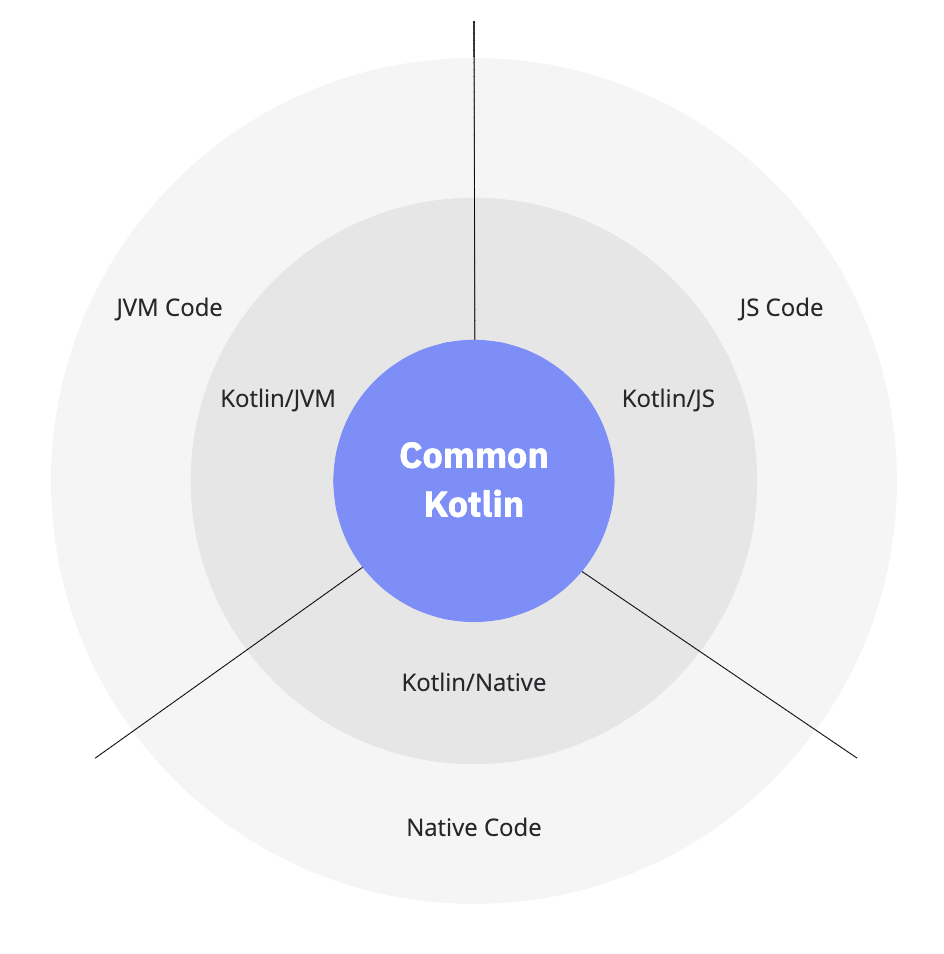
- Common Kotlin includes the language, core libraries, and basic tools. Code written in common Kotlin works everywhere on all platforms.
- With Kotlin multi-platform libraries, you can reuse the multi-platform logic in common and platform-specific code. Common code can rely on a set of libraries that cover everyday tasks such as HTTP, serialization, and managing coroutines.
- To interop with platforms, use platform-specific versions of Kotlin. Platform-specific versions of Kotlin (Kotlin/JVM, Kotlin/JS, Kotlin/Native) include extensions to the Kotlin language, and platform-specific libraries and tools.
- Through these platforms you can access the platform native code (JVM, JS, and Native) and leverage all native capabilities.
Compilation and Execution of Kotlin code on JVM
You can use Intellij to write code in languages other than Kotlin as well, including Java, Python, Scala etc. When you select Kotlin/JVM, you are telling Intellij that you intend to write Kotlin code that targets, or runs on, Java Virtual Machine.
How does Kotlin/JVM code gets compiled and executed?
Intellij compiles the Kotlin code using the kotlin-jvm compiler. This means Intellij translates the Kotlin code into bytecode, the language that the JVM speaks. Then this bytecode is executed on the JVM.
Each hardware, such as Windows or macOS, has its own instruction set. The JVM acts as a bridge between the bytecode and the different hardware and software environments the JVM runs on, reading a piece of bytecode and calling the corresponding platform-specific instruction(s) that map to that bytecode. Therefore, there are different versions of the JVM for different platforms.
This is what allows Kotlin developers to write platform-independent code that can be written one time and then compiled into bytecode and executed on different devices regardless of their operating systems.
Note: Kotlin is not limited to JVM. Kotlin can also be compiled into JavaScript or even into native binaries that run directly on a given platform — such as Windows, Linux, macOS — negating the need for a virtual machine layer.
When creating our project we need to link our project to the Java Development Kit (JDK). Why do we need the JDK to write a Kotlin program?
The JDK gives Intellij access to all the JVM and to Java tools that are necessary for converting your Kotlin code to bytecode.
Inspecting Kotlin Bytecode
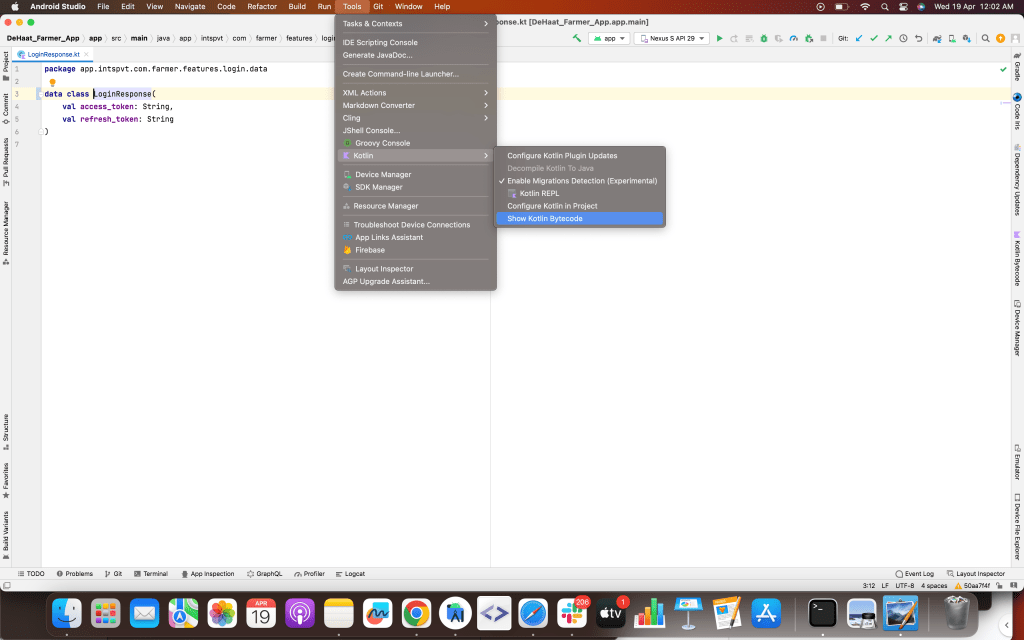
Press the Shift key twice to open the Search everywhere dialog. Begin entering “show Kotlin bytecode” in the search box, and select “Show Kotlin Bytecode” from the list of available actions when it appears. You can also open the tool window with Tools -> Kotlin -> Show Kotlin Bytecode.
In the bytecode tool window, click the “Decompile” button at the top left. A new tab will open showing FileName.decompiled.java, a Java version of the bytecode the Kotlin compiler generated for the JVM. The bytecode gives a behind-the-scenes look at Kotlin’s type inference support.
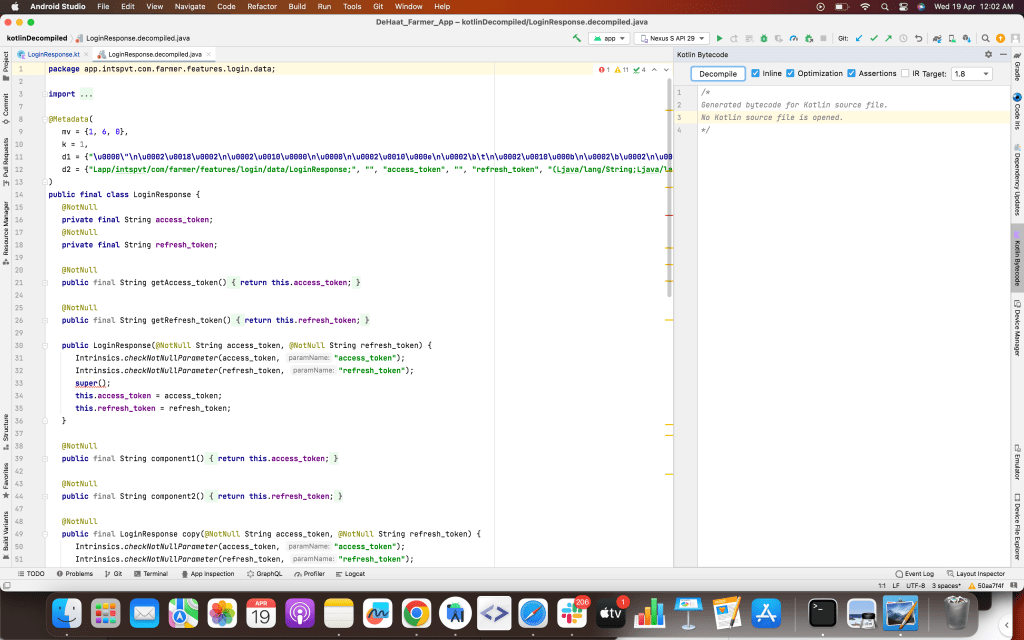
Note: The red underlines in this case are due to a quirk in the interaction between Kotlin and Java, rather than a problem.
That’s it for this article. Hope it was helpful! If you like it, please hit like.
Other blogs of this series:
 Tanya Tech Zone